Sunday, September 28, 2014

စြယ္စံုသံုး အင္တာနက္ ကြန္နရွင္နဲ႕ PC ရဲ႕ Speed ကိုျမွင့္တင္ေပးမယ့္ Auslogics BoostSpeed v6.3.0.0 + Crack


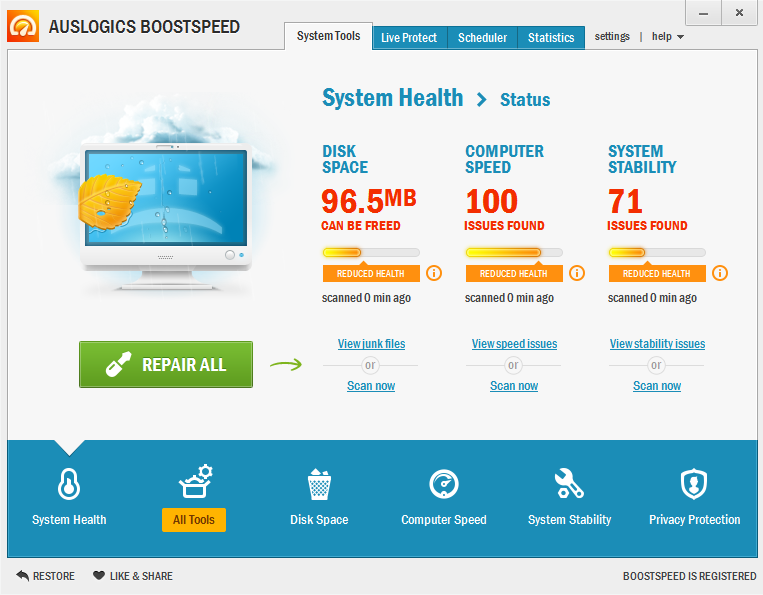
Auslogics BoostSpeed ဆိုတဲ႕ စြယ္စံုသံုး Maintenance Tool ကိုေတာ့ ေတာ္ေတာ္မ်ားမ်ားရင္းႏွီးၾကမယ္လို႕ ထင္ပါတယ္ဗ်ာ။ မိမိရဲ႕ ကြန္ျပဴတာအတြက္ အသံုးတည့္ေစမယ့္ Tools ေပါင္း 13မ်ိဳးအထက္ပါ၀င္ပါတယ္ဗ်ာ။ Disk Defrag , Internet Optimizer , Tweak Manager , Duplicate File Finder , File Shredder , Disk Wiper , Startup Manager , Uninstall Manager , Service Manager , Task Manager , System Information , Rescue Center , Browser Manager စတဲ႕ Tools ေတြပါ၀င္ပါတယ္။ ရင္းႏွီးျပီးသားကေတာ့ အေပၚမွာေျပာျပခဲ႕တဲ႕ Feature ေတြကိသိႏိုင္ပါတယ္။ မသိေသးသူမ်ားအတြက္လည္း Tools တစ္ခုခ်င္းရဲ႕ လုပ္ေဆာင္ခ်က္အေသး စိတ္ကိုရွင္းျပေပးထားပါတယ္ဗ်ာ။


Your one-stop PC maintenance and optimization tool.
The program will clean up, speed up and fix your slow
computer to make it run as fast and stable as new.
  • Cleans up the Windows registry
  • Defragments hard drives
  • Frees up disk space
  • Recovers accidentally deleted files
  • Speeds up Internet connection

Disk Cleanup

Disk cleanup is considered to be one of the most important aspects of computer maintenance, because Windows accumulates unnecessary temporary files and other clutter that severely affects computer performance.

Disk Defragmentation & Optimization

Disk fragmentation is a phenomenon that usually occurs either when Windows fills fragmented empty space with a newly created file and splits a file to fit the bits of free space, or when a file grows and requires more space. This is how free space fragmentation eventually causes file fragmentation.

Registry Defragmentation

The registry is the core database of the Windows operating system. It stores and manages settings for all hardware, operating system software, all other applications, and user settings. The registry is altered every time software is installed or uninstalled, as well as when settings are being configured. These constant changes cause the registry to grow in size and deleting entries inevitably leads to registry fragmentation. As a result the registry loses its linear structure, which leads to increased registry access and application response time.

Internet Optimization

When it comes to Internet connection settings, most Windows-based computers use general presets that are not optimized for any particular connection type. This means that a lot of computer users' actual download/upload speed is significantly lower than the one offered by their ISPs.

File Recovery

Deleting important files by accident is a common enough mistake. Fortunately, it is possible to recover deleted files. Typically, files deleted by user, lost because of a hardware failure or a virus attack are not completely erased immediately.


Brand New Features


System Scan
Auslogics BoostSpeed 6 has a brand new interface that allows you to jump straight in, selecting the desired actions. Your current system state is displayed in the main window. All major tasks, such as removing junk files, defragmenting disks and repairing registry errors can be done with just a couple of mouse clicks. You can also switch to additional tabs with optimization advice, resources usage information and advanced tools for even more control over your system.
File Recovery
If you have accidentally deleted an important document or a picture - don't panic! Auslogics BoostSpeed 6 is supplied with the File Recovery tool. This program will recover accidentally deleted files or files deleted by virus attacks and software faults. Auslogics File Recovery has the ability to preview photos and even documents while browsing through the list of found files. This feature will help you to recover exactly what you need.

Disk Doctor 
This tool checks your hard drives for problems related to bad sectors, lost clusters and directory errors. With Disk Doctor you will be able to recover data from unreadable sectors and monitor your hard drive health. We highly recommend running this tool at least once a month. If you start seeing lots of bad sectors, it is better to make a backup copy of your important files and consider getting a new hard drive. This will save your data from being lost.
Disk Explorer
Auslogics Disk Explorer is designed to help you track disk space usage. It will display an intuitive and easy to understand pie chart, that will show you the largest files and folders on your disks. By using Disk Explorer you can easily and quickly free up additional space on your disk when needed. Just select the "Top 100 files" list to see which files are taking up the most of your hard drive space and save them to a CD, DVD, or removable drive.

Improved Features
  • Disk Defrag
  • Internet Optimizer
  • Tweak Manager
  • Duplicate File Finder
  • File Shredder
  • Disk Wiper
  • Startup Manager
  • Uninstall Manager
  • Service Manager
  • Task Manager
  • System Information
  • Rescue Center
  • Browser Manager

What's new in v6.3.0.0
  • corrected all known bugs
  • made numerous improvements to all program modules

System Requirements

  • Win 8 (32 or 64 bit), Win 7 (32 or 64 bit), Vista SP2 (32-bit only), XP SP3 (32-bit only)
  • 60 MB available hard disk space
  • 512 MB RAM


**  Step-1.ေအာက္က Download Button ကိုႏွိပ္လိုက္ပါ  

**  Step-2. "5sec". ေလာက္ေစာင္႕ေပးပါ။

**  Step-3. "  << SKIP AD >>   ".ကိုႏွိပ္ေပးပါ။

**  Step-4. Download Link က်လာပါလိမ္႕မယ္။

**  အဆင္ေျပပါေစဗ်ာ။

Computer Speed ကို 200% မွ 500% ထိျမန္ႏႈန္း ျမင့္တင္ေပးႏိုင္တဲ႕ Startup Faster v3.6.2011.14 + Serial

ေခါင္းစဥ္ကို ၾကည့္လိုက္တာနဲ႕တင္ဘဲ အားလံုးစိတ္၀င္စားသြားမယ့္ Software ေလးျဖစ္မွာပါ။ ကြန္ျပဴတာ
ရဲ႕ System Speed ကို 200% ကေနျပီး 500% ထိျမွင့္တင္ေပးႏိုင္ပါတယ္ဗ်ာ။ တကယ့္ကိုျမွင့္တင္ေပးႏိုင္
တာပါ။ Model ျမင့္တဲ႕ ကြန္ျပဴတာေတြမွာ ျမန္ႏႈန္းျမွင့္လိုက္တာကို မသိသာေပမယ့္ Model နိမ့္တဲ႕ကြန္ျပဴ
တာေတြမွာေတာ့ ေတာ္ေတာ္ၾကီးကို သိသိသာသာ ျမန္ဆန္လာတာကိုေတြ႕ရမွာပါ။ စမ္းျပီးသံုးၾကည့္လိုက္
ပါ အသံုးျပဳရတာလည္း လြယ္ကူရိုးစင္းတဲ့အတြက္ ရွင္းျပမေနေတာ့ပါဘူးေနာ္။ အျမဲတမ္းသံုးႏိုင္ေအာင္လို႕
Serial Key ကိုပါထည့္သြင္းေပးလိုက္ပါတယ္ဗ်ာ။
Startup Faster! 3.6.2011.14 DC 06.02.2013 Full Serial is just designed to solve this problem. We developed an unique technology called “SmartBoot??? to speed up the startup process. With “SmartBoot”, Startup Faster! could optimize your boot sequence by adjusting execution time and disk load. It controls Windows loading and makes great improvements! From thousands of tests on various computers, Startup Faster! 3.6.2011.14 DC 06.02.2013 Full Serial can speed up your loading speed by 200% to 500%! Startup Faster! 3.6.2011.14 DC 06.02.2013 Full Serial supplies a Startup Manager interface to Enable/Disable/Delete any program in the startup list, remove unnecessary program from being launched automatically will also improve boot speed.

Why do I need Startup Faster! 3.6.2011.14 DC 06.02.2013 Full Serial...?

Save time:


  • Startup Faster! 3.6.2011.14 DC 06.02.2013 Full Serial greatly reduces the loading time of Windows, it saves you a lot of time every time you restart. Even if you are using a slow machine, you will find your computer is performing at least 2 times faster.


Protect your hard disk:


  • Perhaps you’ve heard that mass read and write of hard disk within short time can do great harm to hard disk, actually that???s one reason that caused hard disk to crash. If you install programs often and your startup list is filled with various programs, the risk will get higher. for the hard disk is running its??? capacity. Startup Faster! effectively reduces the loads of hard disk, as well as reduces the disk noise. Try Startup Faster! once and you will see the difference.


Manage the startup list:


  • It’s not an easy job to run programs in a certain order without Startup Faster! 3.6.2011.14 DC 06.02.2013 Full Serial. The order is important in some cases, since some programs depend on other programs so they must be launched in order. Another example, launching smaller program first will get systemto be ready faster.

  • There’s also another common problem: some programs leave dead links in startup groups and registries, even if the programs were uninstalled. Startup Faster! can find and remove these dead links. You can also manually remove or add any program to your startup list. With Startup Faster! you take full control.


**  Step-1.ေအာက္က Download Button ကိုႏွိပ္လိုက္ပါ  

**  Step-2. "5sec". ေလာက္ေစာင္႕ေပးပါ။

**  Step-3. "  << SKIP AD >>   ".ကိုႏွိပ္ေပးပါ။

**  Step-4. Download Link က်လာပါလိမ္႕မယ္။

**  အဆင္ေျပပါေစဗ်ာ။

✔ဖုန္​းဝန္​​ေဆာင္​မႈမ်ားApk(android)✔

image-MPT,MEC,OOREDOO,TELENOR
မ်ားအတြက္​
-​ေငြလက္​က်န္​စစ္​ရန္​
-ဖုန္​းထဲသို႔​ေငြျပန္​ျဖည္​့ရန္​
-အျခားဖုန္​းသို႔​ေငြျဖည္​့​ေပးရန္​
-အင္​တာနက္​​ေလ်ွာက္​ရန္​
-ဆက္​သြယ္​​ေရးဝန္​​ေဆာင္​မႈမ်ားစံုစမ္​းရန္​
-Call Forwarding ​ေလ်ွာက္​ရန္​
-Call Wating ​ေလ်ွာက္​ရန္​
-Miss Call Alert ​ေလ်ွာက္​ရန္​
-Voice Mail ​ေလ်ွာက္​ရန္​
-အပိုဝန္​​ေဆာင္​မႈမ်ားပယ္​ဖ်က္​ရန္​
-​ေငြျဖည္​့မရလ်ွင္​အကူအညီ​ေတာင္​းရန္​
-အသံၫႊန္​ၾကားခ်က္​အတိုင္​​ေငြျဖည္​့/စစ္​ရန္​
-Mobile Money ဝန္​​ေဆာင္​မႈအ​ေၾကာင္​း
-Mobile Money ​ေလ်ွာက္​ရန္​
-အျခားဖုန္​းသို႔​ေငြျဖည္​့ရန္​
-ဖုန္​းထဲမွ​ေငြလႊဲ​ေျပာင္​း​ေပးရန္​
-​ေငြျဖည္​့​ေပးရန္​​ေတာင္​းဆိုျခင္​း
-ဖုန္​းျပန္​​ေခၚခိုင္​းရန္​
-ဝန္​​ေဆာင္​မႈမ်ားကိုစီမံရန္​
-အင္​တာနက္​Dataဝန္​​ေဆာင္​မႈမ်ား
-ဖုန္​းနံပါတ္​ကိုစစ္​​ေဆးရန္​...........
စတဲ့ဝန္​​ေဆာင္​မွာမ်ားကိုဒီapplication​ေလး
က​ေနတဆင္​့အသံုးျပဳလုပ္​​ေဆာင္​​ေစႏိုင္​မွာျဖစ္​
ပါတယ္​။
-လိုအပ္​အသံုးျပဳလိုပါက​ေအာက္​ကလင္​့ခ္​မွာ
​ေဒါင္​းလုပ္​ဆြဲယူအသံုးျပဳႏိုင္​ပါၿပီ-
DOWNLOAD ဆြဲရန္​လင္​့ခ္​ကိုႏိွပ္​ပါ➳ 

image
image

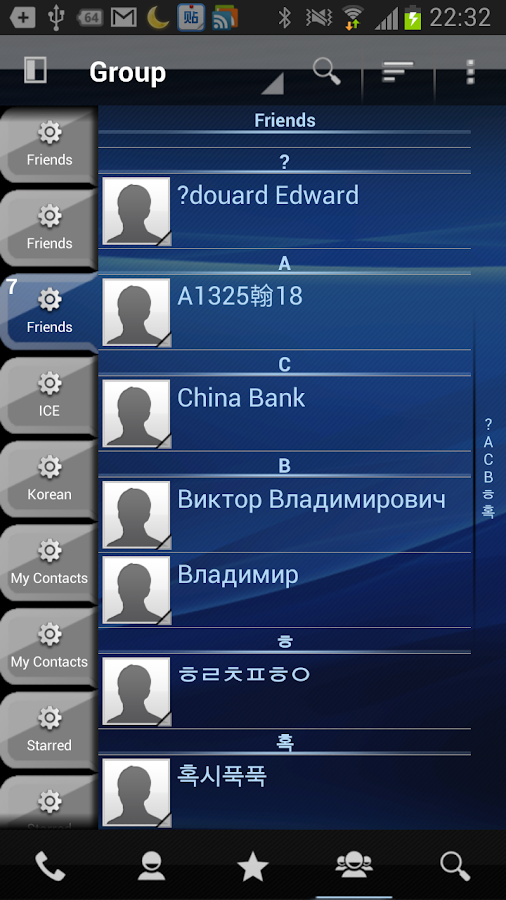
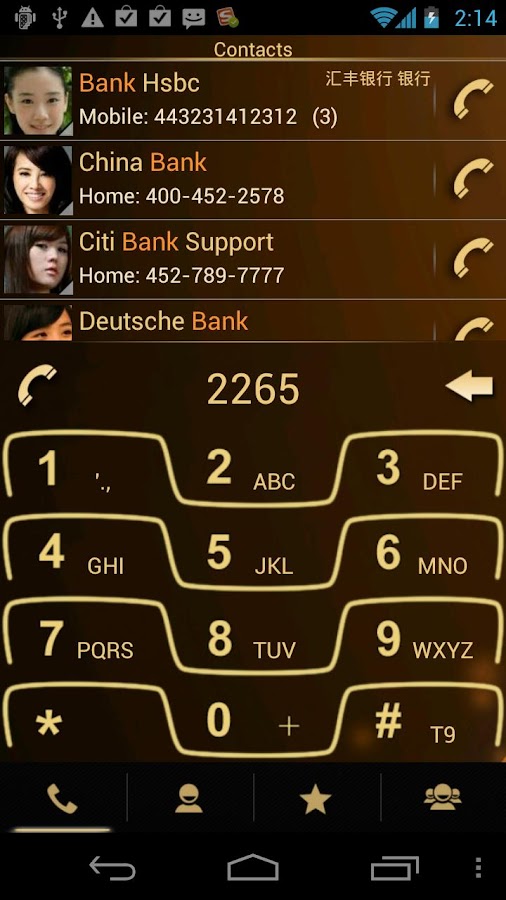
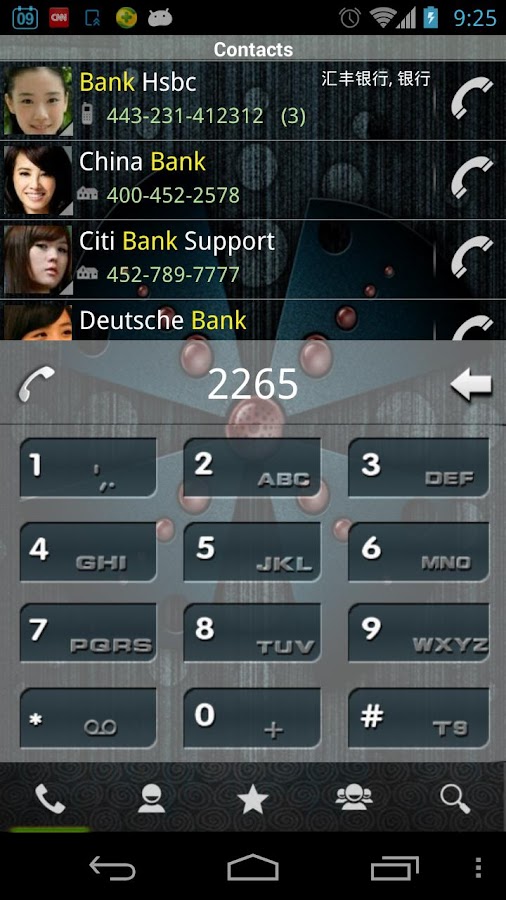
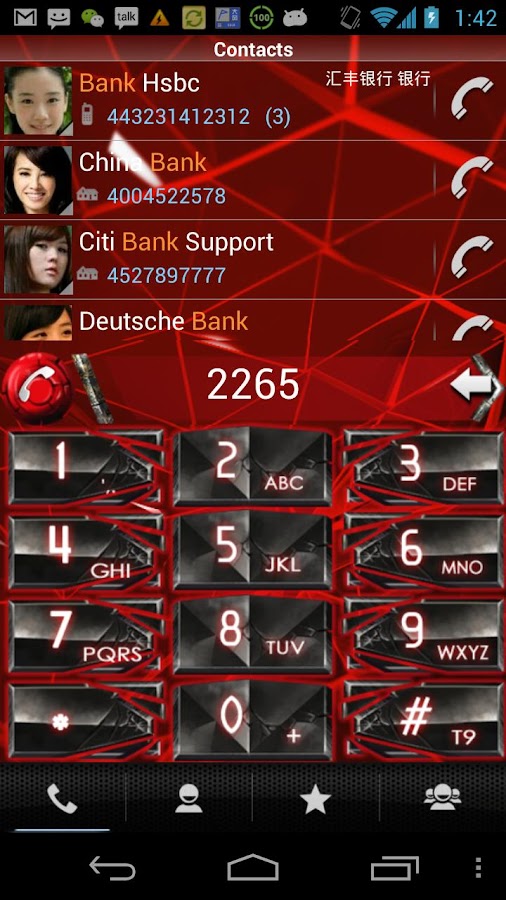
♪ Contact & Call Log List မွာ ပံုေလးေတြအစားသြင္းမယ့္ - Rocket Dial Pro v3.7.7 Apk ♫


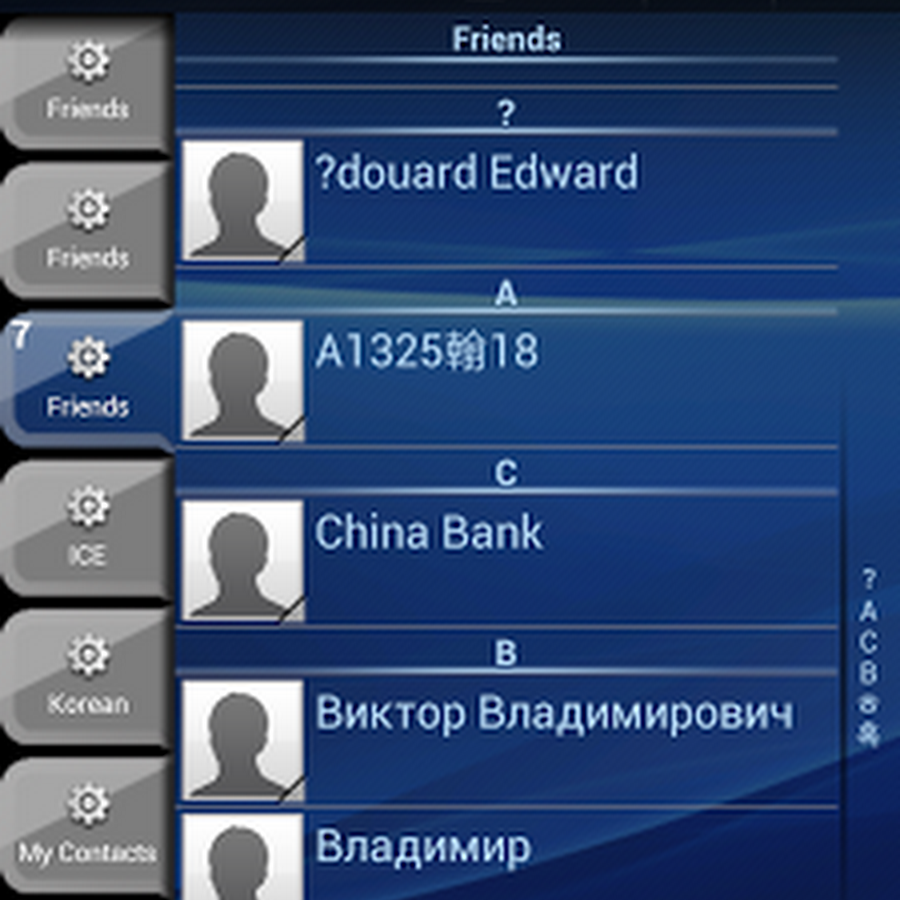
အခုတင္ေပးလိုက္တဲ့ Application ေလးကေတာ့ ပံုမွာျမင္ၾကရတဲ့အတိုင္းပါပဲဗ်ာ။ မိမိဖုန္းရဲ႕ Call Log နဲ႕ Contact List ေတြမ်ာ ေနာက္ခံပံုေဘးေတြနဲ႕အစားသြင္းျပီးအလွဆင္ႏိုင္မယ့္ Application ေလးတစ္ခုျဖစ္ ပါတယ္ဗ်ာ။ Application ရဲ႕ညာဖက္ေထာင့္အေပၚေလးကိုႏွိပ္ျပီး Change Background ဒါမွမဟုတ္ရင္ Change Color ကိုေရြးခ်ယ္ျပီးေျပာင္းႏိုင္မွာျဖစ္ပါတယ္ဗ်ာ။ ဒါ့အျပင္ Keypad ေျပာင္းခ်င္တယ္ဆိုရင္လည္း အခု Application ေလးထဲကေနပဲ Keypad စတိုင္ေတြကိုေဒါင္းယူႏိုင္မွာျဖစ္ပါတယ္ဗ်ာ။ Android OS 2.3 နွင့္အထက္ဖုန္းမ်ားမွာအသံုးျပဳႏိုင္မွာျဖစ္ပါတယ္ဗ်ာ။


<<<ေအာက္မွာ 
Click
 တစ္ခ်က္ေလာက္ႏွိပ္ေပးျခင္းအားျဖင့္ တစ္ဖက္တစ္လမ္းကကူညီရာေရာက္ပါတယ္။
>>>


https://lh3.ggpht.com/NLnb22jgALfAbx4qBok6RtFNkyfx6NkzGyqS9NXkEUpRH8nNSFIytDsehOE4nnIiPw=h900     https://lh6.ggpht.com/1Hbp5jPQENQVEWXLZG0_h2JJsMWKnjDPQva94thpNyDild57fNtcj-5S86N_v9h-PJM=h900

https://lh6.ggpht.com/GXy5MuMx7tNYzvJ6mebHqg0okJLtRwIm4hD-2EA4LojUUEqKGGfrFSMYiE06uQySgrU=h900     https://lh6.ggpht.com/RiUdYf0Ty0KHkPoSy3NFuBsHPImZor-J4QEWXOBBTypYL8hiIZPVRQYLWvVG_2PNO_n9=h900

**  Step-1.ေအာက္က Download Button ကိုႏွိပ္လိုက္ပါ

**  Step-2. "5sec". ေလာက္ေစာင္႕ေပးပါ။

**  Step-3. "  << SKIP AD >>   ".ကိုႏွိပ္ေပးပါ။

**  Step-4. Download Link က်လာပါလိမ္႕မယ္။

**  အဆင္ေျပပါေစဗ်ာ။

   Download

★★ Brave Guardians Mod APK v2.0.2 Unlimited + Coin {Android Game} ★★

ဒီဂိမ္းေလးကိုေတာ့ ေဘာ္ဒါမ်ားအားလံုး သိၾကလိပ္မယ္လို႔ ထင္ပါတယ္။ ကာတြန္႔ဇာတ္ကားေတြထဲမွာ အ
ရမ္းနာမည္ႀကီးခဲတဲ႔  ဂိမ္းေလးကိုတင္ေပးလိုက္တာပါ။ ေအာက္မွာ ScreenShot ေတြနဲ႔ လည္းရိုတ္ျပေပး
ထားပါတယ္။ ဖိုင္ဆိုဒ္က 88Mb ရွိတဲ႔အတြက္ေၾကာင့္ APK နဲ႔ Obb ဖိုင္ကိုခြဲတင္ေပးထားပါတယ္။ Android
2.3 ႏွင့္အထက္ဖုန္းေတြမွာ ကစားႏိုင္ပါတယ္။


Game:  Brave Guardians APK 
Version: 2.0.2 
Android : 2.3  
Market:  https://play.google.com/.brave.guardians  
Mod:  Unlimited Coin and Gems  

Intruction Installing:
Download files's above
Install APK files
Copy Data Files to SDCARD/Android/Obb/HERE
Then Lets Play 
The Game


က်ြန္ေတာ္တင္သမွ်ပိုစ့္ေတြ 
Facebook
 ကေနရယူခ်င္တယ္ဆိုရင္  ဒီမွာ Like ႏွိပ္ပါ။
မန္ဘာ၀င္ခဲ့ျခင္းျဖင့္ ပိုစ့္အသစ္တင္တိုင္း မိမိ Gmail ထဲကိုတိုက္ရိုက္ေရာက္ရွိမည္ျဖစ္ပါသည္။ 
ထို႔ေၾကာင့္မန္ဘာ၀င္ခဲ့ဖို႔ဖိတ္ေခၚပါတယ္။


Thank You For Downloading And Dont Forget to Clicking Once on a Ad Banner.
အဆင္ေျပတယ္္ဆိုရင္ေတာ့ေၾကာ္ျငာမ်ားကို  ကလစ္ခဲ့ပါခင္ဗ်ာ။


★★ CyberLink PowerProducer Ultra Version: 6.0.3026 + Pre-Activated ★★


ဒီေဆာ့ဝဲလ္ေလးကို သူငယ္ခ်င္းမ်ားအားလံုးသိျပီးသားပါ။ Videos &  Photos ေတြကိုအေကာင္းဆံုး ဖန္တီး
တည္းျဖတ္ေပးႏိုင္တဲ့ ေဆာ့စ္၀ဲေကာင္းေလး တစ္ခုဆိုတာေျပာဖို႕ေတာင္မလိုေတာ့ဘူးလို႔ထင္ပါတယ္။ အခု
ဒါေနာက္ဆံုးထြက္လာတဲ့ Version အသစ္ေလးပါ။ Pre-Activated ျဖစ္ၿပီးသားေလးမို႔လို႔ Video တည္းျဖတ္

ေပါ့ပါးၿမန္ဆန္ေအာင္အမိူက္ေတြရွင္းလင္းသုတ္သင္ေပးမယ့္-CCleaner Version 1.05.25 apk


Android ဖုန္းေတြကိုေပါ့ပါးၿမန္ဆန္ေအာင္အမိူက္ေတြရွင္းလင္းသုတ္သင္ေပးႏိူင္တဲ့ CCleaner Version: v1.05.25 apk update ေလးကိုတင္ေပးလိုက္ပါတယ္ ။ ဒီေကာင္ေလးကေတာ့ မိမိရဲ႕ဖုန္းမွာရွိသမ်  junk
ဖိုင္ေတြ antivirus ေတြကိုရွင္းထုတ္ေပးႏိုင္တဲ့မအၿပင္ app manager ေတြကိုသန္႕ရွင္းေပးႏိူင္ကာ

Saturday, September 27, 2014

Paypal Account ဖြင့္နည္း


ကၽြန္ေတာ္အင္တာနက္မွာ နာမည္ႀကီးေနေသာ Paypal Account ေလးကို ဖြင့္ၾကည့္ရေအာင္ဗ်ာ။

ဒီေနေခတ္မွာေတာ့ Paypal Account ကို ျမန္မာနိုင္ငံက အဆင္ေျပေျပဖြင့္နိုင္ေနတာ ေၾကာင့္ အေကာင့္အသစ္ေတြ ဖြင့္ေသာ သူမ်ား မ်ားျပားတာ ေၾကာင့္ ကၽြန္ေတာ္လည္း ကၽြန္ေတာ္သိေသာ အေကာင့္အသစ္ဖြင့္နည္းေလးကို ေရးသားလိုက္ရပါတယ္။

Paypal Account ဆိုတာကေတာ့ အင္တာနက္မွ ေငြေတြကို လက္ခံနိုင္၊ ျပန္ထုတ္နိုင္ေသာ အေကာင့္အမ်ိဳးအစားတစ္ခု ျဖစ္ပါတယ္။

ဘေလာ့ဂ္ေရးသားသူမ်ား၊ အင္တာနက္မွ ေငြရွာဖို႔အတြက္ PTC Site ေတြမွာ ကလစ္လုပ္သူမ်ား အသုံးမ်ား အေကာင့္တစ္ခုျဖစ္ပါတယ္။

ေနာက္ၿပီး အင္တာနက္မွာ ေစ်းဝယ္ရာမွာ အေနာက္ေနာက္ငံေတြမွာ နာမည္ႀကီးေသာ ေငြေျပာင္း၊ေငြလြဲ လက္ခံနိုင္ေသာ အေကာင့္အမ်ိဳးအစား ျဖစ္ပါတယ္။

Paypal Account ကို ဖြင့္ဖို႔အတြက္ လိုအပ္ခ်က္ကေတာ့ အီးေမးလ္တစ္ခု လိုအပ္ပါတယ္။

Gmail , Yahoo, MSN Mail , Other အီးေမးလ္အေကာင့္တစ္ခုခုရွိရင္ အေကာင့္ဖြင့္နိုင္ပါတယ္။


၁) အရင္ဆုံး အေကာင့္အသစ္ဖြင့္ဖို႔ဆိုရင္ www.paypal.com သို႔သြားေရာက္ရပါတယ္။

၂) Sign Up ဆိုတာကို ကလစ္လုပ္ရပါတယ္။

၃) နိုင္ငံေရြးရပါတယ္။ ကၽြန္ေတာ္ကေတာ့ US ကိုပဲ ေရြးပါတယ္။ ျမန္မာမွ လူေတြအတြက္ကေတာ့ US ကို ေရြးတာ အဆင္ေျပပါတယ္။ က်န္ေသာ နိုင္ငံေတြ အတြက္ကေတာ့ သက္ဆိုင္ရာ နိုင္ငံေရြးနိုင္ပါတယ္။ ျမန္မာတစ္နိုင္ငံတည္းသာ ခက္ေနတာပါ။

၄) နိုင္ငံေရြးၿပီးရင္ အေကာင့္ပုံစံ Personal , Business ႏွစ္ခုတည္းက တစ္ခုေရြးရပါတယ္။ ကၽြန္ေတာ္ကေတာ့ ဘာစီးပြားေရးမွ မလုပ္တာမို႔ Personal ကို ပဲ ေရြးမွာပါ။

၅) Email မွာ ကိုယ့္ အီးေမးလ္၊ ပက္စ္ဝက္မွာ ကိုယ့္ႀကိဳက္ရာ ပက္စ္ဝက္၊ ပက္စ္ဝက္က ႏွစ္ႀကိမ္ရိုက္ထည့္ရပါတယ္။ အတူတူထားေပးရမွာ ျဖစ္ပါတယ္။

၆) First Name , Last Name , Address 1 and 2 တို႔မွာ အဆင္ေျပရာ ထည့္သြင္းနိုင္ပါတယ္။

၇) အမွန္ကန္ထည့္သြင္းရမွာေတာ့ City , Stage , Zip Code တို႔ပါ။ ကၽြန္ေတာ္ကေတာ့ US နိုင္ငံက ဖြင့္မွာမို႔ http://www.phaster.com/zip_code.html က အခ်က္လက္ေတြကို ယူသုံးပါတယ္။ အဲဒီလင့္မွာ City , Stage , Zip Code ေတြ ေတြ႕နိုင္ပါတယ္။
ကိုယ္ႀကိဳက္ရာကို နိုင္ပါတယ္။

၈) ဖုန္းကေတာ့ ဆယ္လုံးပါေသာ နံပါတ္ကို သုံးရမွာပါ။ ကၽြန္ေတာ္ကေတာ့ 206335----    ဆိုၿပီးသုံးပါတယ္။ ၿပီးရင္ေတာ့ Yes I Agree … ဆိုတာေလးကို အမွန္ျခစ္၊ Create Account ကို ကလစ္လုပ္လိုက္ရင္ ရပါတယ္။


အေကာင့္က ရသြားေပမဲ့ Verified ျဖစ္ေအာင္လုပ္ရအုံးမွာ ျဖစ္ပါတယ္။ ကၽြန္ေတာ္တို႔ ျမန္မာနိုင္ငံသားေတြဆိုရင္ေတာ့ အဲ့လိုမ်ိဳး Paypal Account Verified ျဖစ္ေအာင္ www.shwemoney.com ကို ဆက္သြယ္ၿပီး ေမးျမန္နိုင္ပါတယ္ခင္ဗ်ား။

အေကာင့္ဖြင့္နည္း အျပည့္အစုံကို ပုံႏွင့္တကြ ၾကည့္ခ်င္ရင္ေတာ့ ကၽြန္ေတာ့္အေကာင့္တစ္ခုကို ဖြင့္တုန္းက ပုံေတြကို ဖမ္းယူထားတာေလးကို စာအုပ္လုပ္ထားတာရွိပါတယ္။ ေအာက္မွာ ေဒါင္းလုပ္ခ္ရယူၿပီး ဖတ္ရွု႔ေလ့လာနိုင္ပါတယ္ခင္ဗ်ား။

စာအုပ္ေလးက ဖိုင္ဆိုဒ္ 2 MB ေလာက္နီးပါးရွိပါတယ္ခင္ဗ်ား။


Download   

ပိုက္ပိုက္ေတြ ရွာနည္းကို သိခ်င္ရင္ေတာ့  ဒီေနရာေလးကို သြားပါခင္ဗ်ား။

Gmail Account အလြယ္ကူဆုံး အေကာင့္ေဖာက့္နည္း ( ဖုန္းနံပါတ္မလို)

ကဲ့ ဒီတစ္ႀကိမ္ေတာ့ ကၽြန္ေတာ္ ကိုဂူဂယ္လ္ေမးလ္အေကာင့္ကို ဖုန္းေတြ ဘာေတြ မေတာင္းပဲ အလြယ္ကူဆုံး ဖြင့္နည္းေလးကို ကၽြန္ေတာ္ ရွဲလိုက္မယ္ေနာ္။

ကၽြန္ေတာ္တို႔ ျမန္မာျပည္မွာ အသုံးမ်ားတဲ့ စက္႐ုပ္ဖုန္းေလးေတြကေနၿပီး ဂူဂယ္လ္အေကာင့္ေဖာက္ရင္ ဘာဖုန္းမွကို မေတာင္းပဲ လြယ္လြယ္ကူကူ အေကာင့္ရပါတယ္။

ကြန္ပ်ဴတာေပၚကေနၿပီး အေကာင့္ေဖာက္ခ်င္ရင္ေရာ္??????

ကၽြန္ေတာ္က ကြန္ပ်ဴတာ အေပၚကေနၿပီး အေကာင့္ေဖာက္ထားတာဗ်။

လြယ္လြယ္ေလး။ သိတယ္မို႔ Blue Stacks Player အစြမ္းေလ။ ကြန္ပ်ဴတာမွာ စက္႐ုပ္အတုေလးနဲ႔ ကၽြန္ေတာ္ စမ္းၾကည့္တာ လုံးဝကို အဆင္ေျပပါတယ္။

Blue Stacks Player ကို http://www.bluestacks.com/app-player.html  မွာ သြားမလို႔ရပါတယ္။ ေဆာ့ဝဲလ္က ကၽြန္ေတာ္စမ္းတာေတာ့ အင္တာနက္ခ်ိတ္ၿပီး ေဆာ့ဝဲလ္ကို Install ျပဳလုပ္ရတာမို႔ ကၽြန္ေတာ္ မူရင္းလင့္ကို ပဲ ညြန္းေပးလိုက္တာ ျဖစ္ပါတယ္။

အဲ့ အခုလိုမ်ိဳးဘာျဖစ္လို႔ အေကာင့္ေဖာက္တာ ခက္ေနလဲလို႔ ေမးရင္ တကယ္က ခက္တာ မဟုတ္ဘူးဗ်။  ကိုဂူဂယ္လ္က သူ႔အေကာင့္ေတြကို လုံးျခဳံေရး ျမႇင့္ထားလို႔ ျဖစ္တာပါ။ မိုဘိုင္းလ္ဖုန္းနဲ႔ ခ်ိတ္သုံးရင္ ပိုၿပီး လုံျခဳံစိတ္ခ်ေသာ အဆင့္ျမင့္အေကာင့္ တစ္ခုပိုင္ဆိုင္ေအာင္ ဖန္တီးခဲ့တာပါ။ ကၽြန္ေတာ္လည္း အခုေလာ္ေလာ္ဆယ္ မိုဘိုင္းလ္ဖုန္း မရွိေသးလို႔ အခုလိုမ်ိဳး ဖုန္းနံပါတ္မေတာင္းတဲ့ နည္းကို အသုံးျပဳေနရတာ။


အေကာင့္ေဖာက္တာက လြယ္ပါတယ္။
လိုအပ္ခ်က္က >>>> Andorid OS သုံး ဖုန္း (သို႔) Tablet ( သို႔ ) Android OS ( For Computer )

ဖုန္း၊Tablet ေတြမွာ Setting > Manage Account > Add Accounts > Google > Create  အဲလိုမ်ိဳးနဲ႔ အေကာင့္ေဖာက္နိုင္ပါတယ္။

တစ္ခ်ိဳ႕ေသာ ဖုန္းေတြက Google App မထည့္ထားရင္ မရပါ။ Huawei အေတာ္မ်ားမ်ားမွာ Google App က ျပန္သြင္းရပါတယ္။

ကြန္ပ်ဴတာသမားေတြကေတာ့ ကၽြန္ေတာ့္လိုမ်ိဳး Blue Stacks Player ကို အသုံးျပဳၿပီး Blue Stacker Player > စက္သြားပုံေလးကို ကလစ္> Manage Accounts > Add Account > Google > Create ဆိုၿပီး အေကာင့္တစ္ခုကို လြယ္လြယ္နဲ႔ ေဖာက့္နိုင္ပါတယ္။

စက္ေတြကလည္း အမ်ားႀကီးရွိတာမို႔ တစ္ခုနဲ႔ တစ္ခုေတာ့ အနည္းငယ္ကြာျခားပါတယ္။

ဒါေပမဲ့လည္း လုပ္ေဆာင္ခ်က္က အတူတူပဲ ျဖစ္မွာပါ။

ကၽြန္ေတာ္ကေတာ့ Blue Stackes Player ေလးကို အသုံးျပဳၿပီး ဒီေန႔ပဲ အေကာင့္အသစ္တစ္ခု ဖြင့္ေပးခဲ့ပါတယ္။

ကၽြန္ေတာ္ အေကာင့္ေဖာက္တာေလးကို စာအုပ္ေလး ျပန္လုပ္ေပးထားလိုက္ပါတယ္။

တကယ္လို႔မ်ား ပုံႏွင့္တကြ အေသးစိတ္အေကာက့္ေဖာက့္တာကို သိခ်င္ေသာ သူမ်ားအတြက္ပါ။

လိုခ်င္ရင္ ေအာက္မွာ ေဒါင္းလုပ္ခ္ရယူနိုင္ပါတယ္ခင္ဗ်ား။

ဖိုင္ဆိုဒ္က 1.23 MB ပါ။


Download   

recent posts

မိမိဘေလာ့ကို submit မွန္မွန္ လုပ္ေပးျခင္းျဖင့္ မိမိဘေလာ့ ျမန္ဆန္မည္ရွင္းလင္းမည္ ေမာက္တင္ျပီး က်လာတဲ့ေဘာက္ထဲမွာ မိမိဘေလာ့လိပ္စာ ထည့္ကာ Submit ကလစ္လိုက္ပါ ဒါဆို ေနာက္ဇယားတစ္ခုမွ သင့္အီးေမးကို ထည့္ျပီး Submit လုပ္လိုက္ပါ

မန္ဘာ၀င္ျခင္းျဖင့္ အသစ္တင္တိုင္းပို႔ေပးပါမည္